
Someone has made your chicken soup recipe every winter for four years. 🥣
She knows your name. She types it into Google. And she finds you, but only after scrolling past AI summaries, recipe carousels, and three other blogs that posted chicken soup last week.
She trusts you, but Google doesn't know that.
That's a gap that the new Tasty Recipes' Trust with Google button fills.
The Trust with Google button for food bloggers
Trust with Google is a button for your recipe posts that lets your most loyal readers officially add your blog as a Google Preferred Source. One click from them, a few seconds of their time, and your content moves to the top of their results.
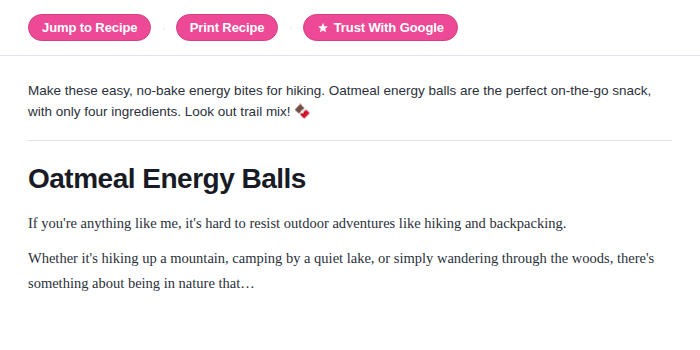
It shows above the competition and above the clutter every time they search.
You've spent years earning those readers, and this is how you make that count.
How does the Google Preferred Sources button work?
Google's Source Preferences feature lets signed-in users tell Google which sites they trust most.
When someone adds your blog as a Preferred Source, Google starts prioritizing your content at the top of their results. This is specifically for them.
According to Google's own data, people click through to their preferred sources twice as often on average. Not twice as much traffic from strangers. Twice as much from the readers who were already looking for you.
The problem is that almost no one knows this feature exists. And even the ones who do aren't going to open a separate tab, search for the Google Source Preferences page, and figure it out on their own.
Tasty Recipes adds the Trust with Google link to your blog at the flip of a switch. And, it comes with our free plugin, Tasty Recipes Lite.
How to get the Trust with Google quick link with Tasty Recipes
Find Trust with Google in your Quick Links settings inside Tasty Recipes (Lite and Pro).
Tick the box, and the link shows on your recipe posts automatically, right alongside Jump to Recipe and Print Recipe.
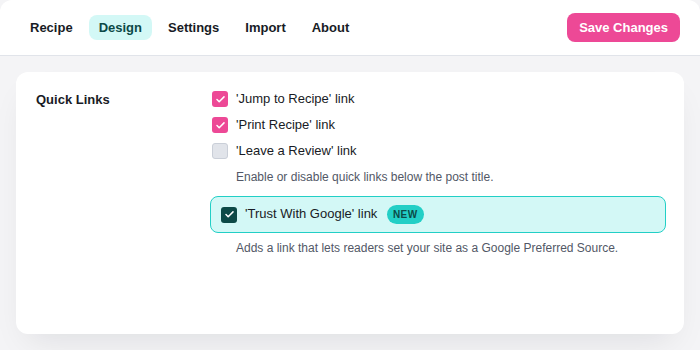
If you have Tasty Recipes Pro and the Quick Links Styling set to Buttons, it'll show as a button on your recipe posts.
When a reader clicks it, Google's Source Preferences page opens in a new tab. They add your blog. Done! The whole thing takes about ten seconds.
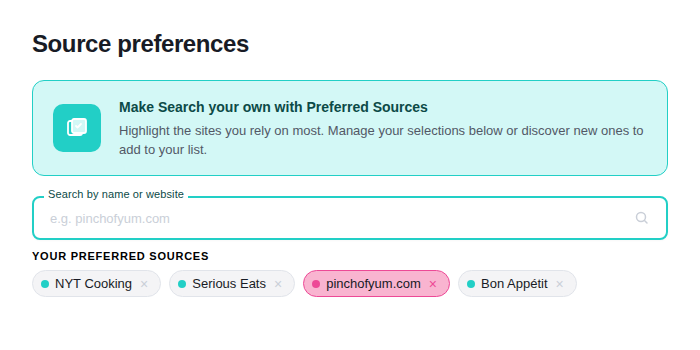
From that point on, Google knows this reader trusts you specifically, and moves your content up in their results every time they search.
You put the button where they already look, and the rest takes care of itself.
Trust with Google works as a loyalty tool
We added this specifically for bloggers who already have readers who come back.
The reader who has made your banana bread regularly and tags you in it. 🍞 The one who searches your name before she searches the recipe. Those readers exist on your blog right now.
The Trust with Google link gives them an easy way to make their loyalty visible to Google.
A couple of things to know before you turn it on
The reader needs to be signed into Google for the preference to save. If they're logged out, they'll reach the Source Preferences page but the choice won't connect to their account.
This also works best for blogs that publish on a consistent schedule. Google's Source Preferences feature is for sites readers can count on for fresh content. If you post sporadically, the impact will be smaller.
🍭 One more Tasty tip: Trust with Google isn't a traffic recovery tool. It won't bring back visitors who have never heard of your blog or reverse broad traffic losses from algorithm changes.
What it does, and does well, is protect the relationship with readers who already love you.
Trust with Google FAQs
- Does my reader need a Google account for this to work?
-
Yes. Google's Source Preferences feature requires readers to be signed in to save the preference. Readers who aren't logged in can reach the page but won't be able to connect it to their account. Most regular, returning visitors are signed into Google, so this rarely gets in the way.
- Will Trust with Google help my Google AI Overview presence?
-
No. AI Overviews are generated by Google's indexing bot and aren't affected by Source Preferences. Trust with Google works on a reader-by-reader basis.
- Where does the Trust with Google button show on my posts?
-
At the top of any post with a Tasty Recipes recipe card. It'll be next to your existing Quick Links buttons like Jump to Recipe and Print Recipe.
- Does this work even if my blog is newer or has a smaller audience?
-
It works best for blogs that publish consistently and have returning readers. If you're earlier in your blogging journey and most of your traffic is from new visitors, the impact will be limited for now. But turning it on costs nothing, and as your audience grows, it'll become more valuable.
- Is the Trust with Google link free?
-
You can add the Trust with Google link to your recipe posts for free with Tasty Recipes Lite. If you want it to show as a button, that's in the paid plan.